
eBooks
Instantly borrow eBooks, audiobooks, movies, TV shows, music, and graphic novels. With hoopla, stream or download titles anytime, anywhere with your library card.

Hoopla is our digital service for streaming and downloading eBooks, audiobooks, movies, TV shows, music, and more. With your library card, you can borrow titles instantly or place holds on high-demand items, all from your phone, tablet, or computer. Because many readers share digital copies, how long items stay checked out matters—especially for popular books.
Read. Return. Repeat.
Finished your eBook or audiobook early? If so, we encourage you to return it as soon as you’re done. Digital titles—especially popular ones—often have waitlists, and returning a book early helps it move quickly to the next reader. When you’ve finished, simply click “Return,” and the next person in line will receive an alert that their hold is ready. It’s a small step that makes a big difference for everyone waiting to read.
To get started, download the hoopla app or visit hoopladigital.com, and create an account using your library card number.


If you're looking for physical books and other materials, check out our catalog.
Hoopla FAQ
How do I borrow?
There are two ways to borrow in hoopla: Flex and Instant. Flex borrows can be checked out if a copy is available, just like a physical book at the library. If it's not available, you can easily join the waitlist. Flex borrows are available for 21 days after you borrow. Instant borrows are always available with no waitlist.
How much can I borrow each month?
You may check out eight Instant borrows each month. And eight rolling Flex borrows.
Your Instant borrows reset at the beginning of the month and do not roll over. Your eight rolling Flex borrows are available at all times. Returning a Flex borrow frees up another Flex borrow.
How many items can I put on hold at a time?
You can put up to 10 items on hold.
Can I renew a book?
You can renew a book up to two times as long as no other customer is on the waitlist for it.
What devices can I use hoopla on?
Hoopla supports iOS devices running iOS 16 or later, Android devices running 7.1 or later, and Kindle Fire tablets and Fire TVs. All other Kindle devices are not supported. Hoopla also supports some LG and Samsung TVs, Roku devices, and more. For a complete list, visit hoopla support.
What does Not In Catalog mean?
Not in Catalog means that our library does not own the license for the title.
There could be a few reasons for this:
The title is too new (or forthcoming) and is not yet available for purchase;
The title is available for purchase but there hasn't been enough interest, or
The title has not yet been requested by a customer.
If there is a Not in Catalog title you may request it by opening the title and selecting the Request button. We can't guarantee that we will fulfill every request, but we do see and review every title requested. Customers may have up to three simultaneous requests at one time. If we order a book you request, we will notify you.
If I can’t find a book I’m looking for, can I recommend that a book be added to hoopla?
Submitting a Title Request on hoopla is a way that you can recommend we add specific titles to the collection. Requests are limited to three requests per person at a time. Please ensure that the eBook or audiobook you’re requesting has been published or will be published within two months of your request. Although we strive to honor requests, purchases are based on multiple factors, including budget, date of publication, popularity, and demand.
How can I get more help?
With general requests regarding hoopla borrows, content, or anything eBook-related, contact us.
Why aren't there unlimited digital copies of books?
Libraries license eBooks under publisher rules. In many cases, a digital copy can only be checked out by one user at a time and may expire after a set number of checkouts or after 1–2 years, requiring the library to purchase it again.
eBooks
Instantly borrow eBooks, audiobooks, movies, TV shows, music, and graphic novels. With hoopla, stream or download titles anytime, anywhere with your library card.
Villians


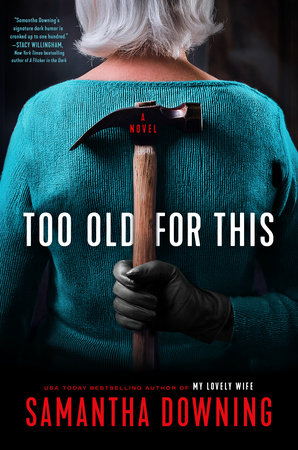
Too Old for This
Samantha Downing

Recommended By
Julie Bascom
Wow! Be forewarned - look closely at the cover of the book before you innocently start reading, like I did. Lottie, an elderly ex-murderer goes on a gruesome killing spree when a true crime journalist threatens to reveal her bloody past. Well written, but the main character is horrific and the details are gory. Axes, duct tape, and deep freezers. That's really all you need to know!

An Elderly Lady Is Up to No Good
Helene Tursten (Author), Marlaine Delargy (Translator)

Recommended By
F. Johnson
Short on time? Check out this short story! Maud is an octogenarian living in Sweden, with no qualms about a little murder. She's rather indifferent to folks dying around her when they get in her way. A great short story with some delightfully dry humor! You'll love (and be terrified) of Maud's murderous adventures. Will she get caught? Or will folks overlook?

The Calamity Club
Kathryn Stockett
Recommended By
Holly Jones
The Calamity Club is a historical fiction book set in Mississippi during the Great Depression. Garnett Pittman was the villain of this story, weaponizing her position as the Orphanage Director to punish those she considers weak and inferior. One of the orphans at the Lafayette County Orphan Asylum, Meg, is the biggest recipient of Garnett's abuse but with the help of other women in the community is able to triumph in the end.

The Folk of the Air Series
Holly Black

Recommended By
Alyssa Krob
When you think of villains in the Folk of the Air series, the first people that come to mind are Balekin or Madoc. But, in my humble opinion, it would be the miscommunication between Jude and Cardan! Things would have turned out so differently if there hadn't been so much miscommunication between the two of them.

Mr. Mercedes
Stephen King

Recommended By
Debbie Henderson
Mr. Mercedes, the first book in Stephen King’s Bill Hodges trilogy, finds King setting aside the supernatural for a horror that is entirely human—and perhaps more terrifying because of it. Brady Hartsfield is calculating, cruel, manipulative, and deeply disturbing, a villain whose outward ordinariness makes his viciousness all the more chilling. Dark, suspenseful, and difficult to put down, Mr. Mercedes introduces readers to one of King’s most despicable—and utterly unforgettable—villains.

The Hunger Games: Sunrise on the Reaping
Suzanne Collins

Recommended By
Leigh Ramey
The sixth book in the popular YA series shares the journey of a young Haymitch Abernathy during this version of the games, the Quarter Quell. Once again, President Coriolanus Snow is featured in the story and known by all in Panem (except many Capitol residents) as the twisted dictator with little to no redeeming qualities. Check out the book before the film comes out in November!
Patron Recommendations

eBooks
Instantly borrow eBooks, audiobooks, movies, TV shows, music, and graphic novels. With hoopla, stream or download titles anytime, anywhere with your library card.